 Manila, Philippines — HUAWEI, the Philippines’ no. 1 tablet brand, is raising the bar for mobile productivity and creative work with the launch of the HUAWEI MatePad Pro Max. Designed for Filipino creators, professionals, students, and multitaskers, the flagship tablet combines PC-level performance, an immersive display, AI-powered tools, and ultra-portable design in one premium device.

Showing posts with label Tablet. Show all posts
Showing posts with label Tablet. Show all posts
Monday, August 10, 2026
HUAWEI MatePad Pro Max Redefines Mobile Productivity and Creativity in the Philippines


Wednesday, July 1, 2026
HUAWEI Philippines Launches Back-to-School Promotions with Productivity Bundles for Students
As students prepare for another academic year filled with online classes, research projects, and digital collaboration, having the right technology has become more important than ever. Recognizing the evolving needs of today's learners, HUAWEI Philippines has officially launched its Back-to-School Promotions, offering exclusive productivity bundles designed to help students study smarter, create efficiently, and stay connected throughout the school year.

At the center of this campaign is the HUAWEI MatePad Family, a lineup of tablets that transforms into a complete productivity workstation. More than just a tablet, the MatePad delivers an impressive 4-in-1 productivity experience, combining a tablet, keyboard, mouse, and HUAWEI M-Pencil into one portable ecosystem. This setup gives students the flexibility to take notes, create presentations, attend online classes, and collaborate on projects from virtually anywhere.
The productivity experience is further enhanced by PC-level WPS Office 3.0, allowing users to work seamlessly with documents, spreadsheets, and presentations. Combined with HUAWEI's intelligent AI-powered tools, students can enjoy smarter note-taking, faster content creation, and improved multitasking, making schoolwork more efficient than ever before.

Expanding its growing device lineup, HUAWEI also introduced the new MatePad Mini and nova Y74 smartphone. The MatePad Mini features a lightweight 8.8-inch display, making it ideal for students who need portability without compromising productivity. Meanwhile, the nova Y74 is designed for users who require long-lasting performance, featuring a massive 6,620mAh battery paired with 40W HUAWEI SuperCharge Turbo, ensuring reliable power throughout busy school days.
To make these devices even more accessible, HUAWEI Philippines is offering special Back-to-School bundle promotions beginning July 7, 2026. Students who purchase eligible HUAWEI MatePad devices can receive a free 4-in-1 accessories package, a one-year WPS AI Membership, and premium school essentials to further enhance their learning experience.
With its combination of innovative hardware, AI-powered productivity features, and exclusive student-focused promotions, HUAWEI Philippines continues to demonstrate its commitment to helping students succeed in today's increasingly digital classroom. Whether attending lectures, completing assignments, or collaborating with classmates, the HUAWEI MatePad Family provides an all-in-one solution designed to keep students productive, creative, and ready for the challenges of the new school year.
Monday, June 1, 2026
Lead, Connect, Inspire with HUAWEI: Applications for HUAWEI Campus Ambassadors, Now Open!
Manila, Philippines — HUAWEI, a global ICT brand committed to addressing the evolving tech needs of consumers, calls on student innovators, creators, and leaders pushing the boundaries of what campus life looks like today—the search for the first-ever HUAWEI Campus Ambassadors is on! Under the five-month initiative, fifteen (15) student ambassadors from Metro Manila will get the chance to experience the 4-in-1 HUAWEI MatePad tablets. Going beyond a standard tablet, this complete PC-like setup combines the device with a Smart Magnetic Keyboard, a precision mouse, and the M-Pencil, giving students a versatile, all-in-one workstation to study, create, and present anywhere.
 More than representing the brand, student ambassadors will test the full HUAWEI ecosystem and see how it elevates their campus life. The program helps them grow their digital presence and welcomes them into a community of peers who are just as driven, creative, and ready to make their mark. As the academic landscape continues to evolve, HUAWEI empowers students to achieve their goals by enabling them to study, create, and present anywhere, helping them unlock their full academic potential.
Empowering Personal and Creative Growth
The HUAWEI Campus Ambassadors program offers rich experiences designed to help students grow personally and creatively throughout the school year.
Campus ambassadors will gain firsthand access to the ultimate PC-like tablets for schools such as the 4-in-1 HUAWEI MatePad 11.5 S 2026, which includes a precision mouse, a Smart Magnetic Keyboard, and the HUAWEI M-Pencil 3rd Gen. This versatile and PC-like device allows students to seamlessly integrate a complete suite of productivity and creativity tools into their daily routines, inside the classroom and beyond.
 The program encourages students to strengthen their valuable and real-world skills, such as communication, digital storytelling, and collaborative networking. By actively participating in monthly campaigns, social calls, and exclusive brand activities, ambassadors are exposed to dynamic experiences that prepare them for future careers, leadership opportunities, and creative pursuits. This includes the chance to unlock exclusive internship opportunities with HUAWEI to jumpstart their professional journeys.
Building a Collaborative Student Community
At the heart of the program is a growing, vibrant community of student creators representing various schools across Metro Manila. Through monthly social calls, ambassadors will have unique opportunities to connect with fellow students who share similar passions for content creation, leadership, technological innovation, and active campus involvement. These meaningful interactions transform the initiative into a collaborative support system where students can freely exchange ideas, share experiences, and spark inspiration.
To further motivate participants, HUAWEI also introduces recognition-driven activities and exclusive rewards with other incentives that celebrate creative consistency throughout the duration of the program. Ambassadors who stand out each month will be featured as the “Ambassador of the Month” on HUAWEI’s official social media platforms and acknowledged during community calls.
Be a HUAWEI Campus Ambassador
Open to dedicated and influential students currently studying in Metro Manila, the HUAWEI Campus Ambassadors program is searching for individuals ready to take their creativity and campus presence to the next level.
Interested applicants can join by submitting their application from June 1 to 14, alongside an optional creative introduction video to showcase their unique personality and commitment to the role. Shortlisted applicants will then advance to an online interview with HUAWEI.
Fifteen (15) selected student ambassadors will officially begin their campus ambassador journey during a grand launch event this June. Alongside exclusive perks, hands-on activities, real-world internship prospects, and enriching community experiences, HUAWEI will also give major recognitions and prizes to the top-performing ambassadors.
Be a part of HUAWEI’s Campus Ambassadors. Submit your application today and get the chance to represent HUAWEI while unlocking exclusive perks, experiences, and opportunities throughout the school year.
Visit your nearest HUAWEI Experience Stores or HUAWEI’s Facebook Page to know more.

Empowering Personal and Creative Growth
The HUAWEI Campus Ambassadors program offers rich experiences designed to help students grow personally and creatively throughout the school year.
Campus ambassadors will gain firsthand access to the ultimate PC-like tablets for schools such as the 4-in-1 HUAWEI MatePad 11.5 S 2026, which includes a precision mouse, a Smart Magnetic Keyboard, and the HUAWEI M-Pencil 3rd Gen. This versatile and PC-like device allows students to seamlessly integrate a complete suite of productivity and creativity tools into their daily routines, inside the classroom and beyond.

Building a Collaborative Student Community
At the heart of the program is a growing, vibrant community of student creators representing various schools across Metro Manila. Through monthly social calls, ambassadors will have unique opportunities to connect with fellow students who share similar passions for content creation, leadership, technological innovation, and active campus involvement. These meaningful interactions transform the initiative into a collaborative support system where students can freely exchange ideas, share experiences, and spark inspiration.
To further motivate participants, HUAWEI also introduces recognition-driven activities and exclusive rewards with other incentives that celebrate creative consistency throughout the duration of the program. Ambassadors who stand out each month will be featured as the “Ambassador of the Month” on HUAWEI’s official social media platforms and acknowledged during community calls.
Be a HUAWEI Campus Ambassador
Open to dedicated and influential students currently studying in Metro Manila, the HUAWEI Campus Ambassadors program is searching for individuals ready to take their creativity and campus presence to the next level.
Interested applicants can join by submitting their application from June 1 to 14, alongside an optional creative introduction video to showcase their unique personality and commitment to the role. Shortlisted applicants will then advance to an online interview with HUAWEI.
Fifteen (15) selected student ambassadors will officially begin their campus ambassador journey during a grand launch event this June. Alongside exclusive perks, hands-on activities, real-world internship prospects, and enriching community experiences, HUAWEI will also give major recognitions and prizes to the top-performing ambassadors.
Be a part of HUAWEI’s Campus Ambassadors. Submit your application today and get the chance to represent HUAWEI while unlocking exclusive perks, experiences, and opportunities throughout the school year.
Visit your nearest HUAWEI Experience Stores or HUAWEI’s Facebook Page to know more.
Monday, May 11, 2026
HUAWEI and Ateneo Graduate School of Business Elevate the MBA Learning Experience with the HUAWEI MatePad 11.5 S 2026
Manila, Philippines — HUAWEI Philippines recently collaborated with the Ateneo Graduate School of Business Student Council (AGSB Student Council) to support AGSB students in navigating the rigorous demands of graduate education. Through the Strategic Management (STRAMA) Deep Dive, the initiative enabled AGSB students to experience the HUAWEI MatePad 11.5 S 2026, allowing them to strengthen their approach to complex problem-solving, data analysis, and decision-making with greater clarity and discipline in preparation for leadership roles.
As part of this shared goal, HUAWEI introduced the HUAWEI MatePad 11.5 S 2026 through an interactive product showcase booth during the STRAMA Deep Dive on April 25. This allowed AGSB students to experience its latest innovations firsthand and understand how purposeful digital tools can reduce academic friction and support more adaptable study workflows.
The STRAMA Deep Dive sessions brought together approximately 60 graduate AGSB students onsite and 100 participants online per session, held on April 11 and April 25 at the APS Amphitheater, Ateneo de Manila University – Rockwell Campus.
“HUAWEI’s commitment to innovation is reflected in how the device integrates both hardware and software,” said John Carlo Capanas, AGSB Student Council Vice President for External Affairs. “After using the HUAWEI MatePad 11.5 S 2026, I gained a better appreciation for how they design products for productivity. Everything, from the display to the accessories to the apps, works together to create a more efficient workflow.”
By providing a smart, responsive ecosystem, HUAWEI illustrates how technology elevates MBA learning well beyond basic efficiency. It helps AGSB students build the essential digital skills they need for the corporate world while fostering the responsibility, focus, and intentionality to be effective leaders in complex, high-stakes environments.
Unlocking Graduate-Level Efficiency with Powerful and PC-Like Performance
Navigating the intensive STRAMA sessions required the flexibility and strategic mindset expected of top-tier executives. As part of the collaboration, AGSB students used the HUAWEI MatePad 11.5 S 2026 to remove the traditional friction between on-the-go convenience and heavy-duty academic analysis. Rather than being tied to a desk, they were able to leverage the tablet’s PC-Level WPS Office 3.0 to process intricate datasets and draft comprehensive papers on the go.
 The device’s evolved 4-in-1 productivity ecosystem further enhances this adaptability. Equipped with the HUAWEI Smart Magnetic Keyboard, M-Pencil (3rd Gen), and Bluetooth mouse, the tablet instantly transforms into a full workstation. With robust spreadsheet functionalities at their fingertips, the platform enabled students to perform data-intensive analysis with the speed, precision, and reliability of a traditional laptop.
“As an MBA student, 'Lite' versions of software just don't cut it. WPS Office 3.0 is a game-changer because it provides a PC-level experience. When I’m analyzing market trends or writing my thesis, I have the full power of desktop-grade tools. I can open multiple windows, run complex formulas, and format documents exactly as I would on a computer. It makes the academic 'heavy lifting' feel effortless,” shared by Christian Jerome De Guzman, AGSB Student Council Officer-in-Charge for the Finance and Resource Management Committee.
Sustaining Focus with the Ultra-Clear PaperMatte Display, HUAWEI Notes, and GoPaint
Strategic foresight during the rigorous STRAMA sessions needs focus to simulate real-world corporate work. This requires AGSB students to synthesize volumes of case studies, journals, and industry reports, while managing cognitive load to prevent fatigue.
The HUAWEI MatePad 11.5 S 2026 supports this journey by easing the heavy academic burden through its 11.5-inch 2.8K Ultra-Clear 3rd Gen PaperMatte Display. By combining high-precision nanoscale anti-glare technology with 3A+ glass, the tablet’s display blocks 99% of ambient light interference and significantly reduces screen sparkle by 50%. This results in a soothing, paper-like viewing experience that dramatically cuts down on the visual strain typical of traditional monitors.
“The PaperMatte Display is something I didn’t realize I needed until I experienced it. It feels closer to reading on paper, which makes long study sessions much more comfortable,” said Mary Jazel Louise Espiritu, AGSB Student Council Treasurer. “There’s less glare and eye strain, so I can focus longer—especially when going through heavy readings or reviewing documents late at night.”
Students and professionals can efficiently organize their research in HUAWEI Notes using Note Replay, AI Equation Recognition, and AI handwriting enhancement. They can also enjoy the free GoPaint app’s versatile digital canvas for mapping out complex strategic frameworks or exploring creative illustration.
By delivering a display that eases visual fatigue while encouraging creative problem-solving with HUAWEI Notes and GoPaint app, the HUAWEI MatePad 11.5 S 2026 helps users develop the mental focus to stay organized and productive to solve complex problems.
All-Day Performance and Entertainment-Ready Portability
A crucial part of leadership formation is maintaining a sustainable pace, especially during intensive STRAMA sessions where MBA students must deliver high-level strategic work while managing their time efficiently. To support this balanced lifestyle, the HUAWEI MatePad 11.5 S 2026 features an ultra-thin 6.1 mm design and a reliable 8,800 mAh battery, allowing students to seamlessly transition from campus collaborations to home study without worrying about charging.
When it is time to step away from complex research, the tablet also transforms into an entertainment hub. Its high-resolution 2.8K display and immersive multi-driver speakers provide a rich audiovisual experience, offering students a refined way to unwind after a productive day.
“For me, the HUAWEI MatePad 11.5 S 2026 is really about making things more manageable. As a graduate student, there are a lot of demands. So having a device that helps you stay organized, productive, and focused makes a real difference. It becomes more than just a device—it becomes part of how you navigate your daily responsibilities,” said John Carlo Capanas, AGSB Student Council Vice President for External Affairs.
Get PC-Level Power for Future Professionals with the HUAWEI MatePad 11.5 S 2026
The HUAWEI MatePad 11.5 S 2026 is designed to support both professional and academic needs. Available for PHP 29,999, it comes as a comprehensive 4-in-1 bundle, complete with the tablet, HUAWEI Smart Magnetic Keyboard, M-Pencil (3rd Gen), and a Bluetooth mouse—providing a full PC-level workspace right out of the box.
To learn more about how HUAWEI’s digital tools can empower the student experience, visit HUAWEI Experience Stores nationwide, the HUAWEI Online Store, or HUAWEI’s official social media pages (Facebook | Instagram).

As part of this shared goal, HUAWEI introduced the HUAWEI MatePad 11.5 S 2026 through an interactive product showcase booth during the STRAMA Deep Dive on April 25. This allowed AGSB students to experience its latest innovations firsthand and understand how purposeful digital tools can reduce academic friction and support more adaptable study workflows.
The STRAMA Deep Dive sessions brought together approximately 60 graduate AGSB students onsite and 100 participants online per session, held on April 11 and April 25 at the APS Amphitheater, Ateneo de Manila University – Rockwell Campus.
“HUAWEI’s commitment to innovation is reflected in how the device integrates both hardware and software,” said John Carlo Capanas, AGSB Student Council Vice President for External Affairs. “After using the HUAWEI MatePad 11.5 S 2026, I gained a better appreciation for how they design products for productivity. Everything, from the display to the accessories to the apps, works together to create a more efficient workflow.”
By providing a smart, responsive ecosystem, HUAWEI illustrates how technology elevates MBA learning well beyond basic efficiency. It helps AGSB students build the essential digital skills they need for the corporate world while fostering the responsibility, focus, and intentionality to be effective leaders in complex, high-stakes environments.
Unlocking Graduate-Level Efficiency with Powerful and PC-Like Performance
Navigating the intensive STRAMA sessions required the flexibility and strategic mindset expected of top-tier executives. As part of the collaboration, AGSB students used the HUAWEI MatePad 11.5 S 2026 to remove the traditional friction between on-the-go convenience and heavy-duty academic analysis. Rather than being tied to a desk, they were able to leverage the tablet’s PC-Level WPS Office 3.0 to process intricate datasets and draft comprehensive papers on the go.

“As an MBA student, 'Lite' versions of software just don't cut it. WPS Office 3.0 is a game-changer because it provides a PC-level experience. When I’m analyzing market trends or writing my thesis, I have the full power of desktop-grade tools. I can open multiple windows, run complex formulas, and format documents exactly as I would on a computer. It makes the academic 'heavy lifting' feel effortless,” shared by Christian Jerome De Guzman, AGSB Student Council Officer-in-Charge for the Finance and Resource Management Committee.
Sustaining Focus with the Ultra-Clear PaperMatte Display, HUAWEI Notes, and GoPaint
Strategic foresight during the rigorous STRAMA sessions needs focus to simulate real-world corporate work. This requires AGSB students to synthesize volumes of case studies, journals, and industry reports, while managing cognitive load to prevent fatigue.
The HUAWEI MatePad 11.5 S 2026 supports this journey by easing the heavy academic burden through its 11.5-inch 2.8K Ultra-Clear 3rd Gen PaperMatte Display. By combining high-precision nanoscale anti-glare technology with 3A+ glass, the tablet’s display blocks 99% of ambient light interference and significantly reduces screen sparkle by 50%. This results in a soothing, paper-like viewing experience that dramatically cuts down on the visual strain typical of traditional monitors.
“The PaperMatte Display is something I didn’t realize I needed until I experienced it. It feels closer to reading on paper, which makes long study sessions much more comfortable,” said Mary Jazel Louise Espiritu, AGSB Student Council Treasurer. “There’s less glare and eye strain, so I can focus longer—especially when going through heavy readings or reviewing documents late at night.”
Students and professionals can efficiently organize their research in HUAWEI Notes using Note Replay, AI Equation Recognition, and AI handwriting enhancement. They can also enjoy the free GoPaint app’s versatile digital canvas for mapping out complex strategic frameworks or exploring creative illustration.
By delivering a display that eases visual fatigue while encouraging creative problem-solving with HUAWEI Notes and GoPaint app, the HUAWEI MatePad 11.5 S 2026 helps users develop the mental focus to stay organized and productive to solve complex problems.
All-Day Performance and Entertainment-Ready Portability
A crucial part of leadership formation is maintaining a sustainable pace, especially during intensive STRAMA sessions where MBA students must deliver high-level strategic work while managing their time efficiently. To support this balanced lifestyle, the HUAWEI MatePad 11.5 S 2026 features an ultra-thin 6.1 mm design and a reliable 8,800 mAh battery, allowing students to seamlessly transition from campus collaborations to home study without worrying about charging.
When it is time to step away from complex research, the tablet also transforms into an entertainment hub. Its high-resolution 2.8K display and immersive multi-driver speakers provide a rich audiovisual experience, offering students a refined way to unwind after a productive day.
“For me, the HUAWEI MatePad 11.5 S 2026 is really about making things more manageable. As a graduate student, there are a lot of demands. So having a device that helps you stay organized, productive, and focused makes a real difference. It becomes more than just a device—it becomes part of how you navigate your daily responsibilities,” said John Carlo Capanas, AGSB Student Council Vice President for External Affairs.
Get PC-Level Power for Future Professionals with the HUAWEI MatePad 11.5 S 2026
The HUAWEI MatePad 11.5 S 2026 is designed to support both professional and academic needs. Available for PHP 29,999, it comes as a comprehensive 4-in-1 bundle, complete with the tablet, HUAWEI Smart Magnetic Keyboard, M-Pencil (3rd Gen), and a Bluetooth mouse—providing a full PC-level workspace right out of the box.
To learn more about how HUAWEI’s digital tools can empower the student experience, visit HUAWEI Experience Stores nationwide, the HUAWEI Online Store, or HUAWEI’s official social media pages (Facebook | Instagram).
Tuesday, April 7, 2026
HUAWEI MatePad 11.5 S 2026 Showcases a Smarter Future for University Learning in the Philippines
As higher education continues to evolve alongside the demands of modern careers, students and educators are increasingly turning to technology that supports flexibility, creativity, and productivity. Recognizing this shift, HUAWEI Philippines partnered with the University of Asia and the Pacific (UA&P) School of Economics to demonstrate how the HUAWEI MatePad 11.5 S 2026 is transforming the academic experience across disciplines.

Positioned as a 4-in-1 productivity tablet, the device bridges the gap between portability and PC-level performance. With its Smart Magnetic Keyboard, M-Pencil (3rd Gen), and Bluetooth mouse working together through NearLink connectivity, the MatePad allows users to shift seamlessly between laptop mode, split-screen study sessions, and studio-style creative workflows. This flexibility supports the diverse needs of students, balancing coursework, presentations, and collaborative projects.
One of the tablet’s standout strengths lies in its ability to support academic productivity without compromise. Through WPS Office 3.0, users can handle documents, spreadsheets, and presentations with desktop-style functionality. Advanced features such as pivot tables, LaTeX equation input, and keyboard shortcuts enable complex tasks like thesis writing and data analysis to be completed directly on the tablet. Faculty members also benefit from the ability to prepare lecture materials, annotate files, and manage hybrid classes using a single device.
 Long study hours are further supported by the tablet’s 11.5-inch 2.8K Ultra-clear PaperMatte display. Designed with nanoscale anti-glare technology, the screen reduces reflections and eye strain while maintaining sharp clarity even in bright environments such as classrooms, libraries, and shared study spaces. This paper-like writing experience also enhances note-taking precision, making it especially useful during lectures and research sessions.
Creativity is another area where the MatePad stands out. Integrated tools like HUAWEI Notes and GoPaint enable students and educators to organize ideas, solve equations with AI assistance, and transform complex concepts into engaging diagrams and visual presentations. These features support both analytical learning and creative expression across fields such as economics, business, media, and the humanities.
Despite its powerful capabilities, the device remains highly portable with its slim 6.1 mm metallic body and long-lasting battery that supports more than 10 hours of use. This makes it a practical companion for students moving between classrooms, study halls, cafés, and home learning environments.
Through its collaboration with UA&P, HUAWEI continues to demonstrate how innovative technology can enhance teaching and learning by making productivity more accessible, interactive, and adaptable for today’s university communities.
Wednesday, February 25, 2026
Inside the Workflows of Young Professionals: How They Work Smarter, Create Faster, and Achieve More with the HUAWEI MatePad 11.5 S 2026
Manila, Philippines — Young professionals and students today juggle long hours of research, analysis, and creative work, making focus and productivity more important than ever. From drafting reports and reviewing data to sketching ideas and managing multiple projects, every moment counts. Meeting these demands requires a device that can keep up, and the HUAWEI MatePad 11.5 S 2026 is built to do just that.
As the Philippines’ top tablet brand in 2025 in terms of shipment volume, HUAWEI delivers a smarter, more comfortable productivity tablet that transforms everyday work and study into a more comfortable productivity experience. The HUAWEI MatePad 11.5 S 2026 combines PC-level productivity tools, a paper-like display designed to help reduce eye strain, and reliable all-day performance, empowering users to stay focused, work efficiently, and achieve results wherever work or study takes them.
PC-Level Productivity That Powers Real Workflows
The HUAWEI MatePad 11.5 S 2026 is built for results-driven young professionals and students. Paired with the HUAWEI Smart Magnetic Keyboard, HUAWEI M-Pencil (3rd Gen), and HUAWEI Mouse, the HUAWEI MatePad 11.5 S” 2026 becomes a true 4-in-1 productivity companion, offering Laptop, Split, and Studio modes that adapt to every working style. Typing long-form articles, refining slide decks, or sketching diagrams feels natural, fluid, and efficient, allowing users to stay productive wherever inspiration strikes.
With desktop-class multitasking, switching between documents, spreadsheets, and media becomes effortless. Whether you’re drafting a thesis, preparing client presentations, managing content pipelines, or finalizing reports under tight deadlines, everything works together to help you stay organized, precise, and in full control. The device turns everyday productivity into a smooth, uninterrupted flow.
Powered by PC-level WPS Office 3.0, it handles research-heavy tasks, complex projects, and tight deadlines with ease. Custom Pivot tables, GROUPBY formulas, and LaTeX recognition make data analysis, technical writing, content planning, and professional documentation seamless and efficient.
 Tech reviewer and content creator Ricson Vergara says the HUAWEI MatePad 11.5 S 2026 redefines what working on the go can look like. From drafting detailed review scripts and comparing technical specifications to organizing benchmarks and editing reports, the WPS Office 3.0 allows him to manage his entire workflow seamlessly on a tablet without compromising functionality. Whether he’s reviewing product spreadsheets, polishing presentations, or annotating reference materials, everything feels just as intuitive and capable as working on a laptop.
Ultra-Clear PaperMatte Display That Brings Comfort and Clarity
Designed to support long, demanding days, the 11.5-inch 3rd Gen Ultra-Clear PaperMatte Display makes extended screen time noticeably more comfortable. Crafted with high-precision nanoscale anti-glare etching technology and 3A+ glass, it ensures text appears sharper, visuals stay clearer, and eye strain is kept to a minimum. The HDR Vivid support and 500 nits of brightness ensure clarity whether you’re working indoors, outdoors, or under bright lighting.
Lifestyle creator and entrepreneur Alliah Racelis says the HUAWEI MatePad 11.5 S 2026 transforms how she moves through her day. Before work, she enjoys watching inspirational videos and unwinding with casual games, with vivid colors thanks to P3 color accuracy and smooth motion powered by the 2.8K display and 144Hz adaptive refresh rate. When it’s time to focus, she can seamlessly switch to reviewing documents, organizing content plans, and responding to messages—comfortably and efficiently on the same screen. This smooth transition from entertainment to productivity keeps her motivated, refreshed, and focused all day long.
 Reviewing journals, annotating PDFs, studying data-heavy charts, and sketching ideas recreate the feel of writing on paper due to the display’s subtle micro-vibrations. This helps users remain immersed and engaged even during extended sessions, giving a more natural viewing and writing experience that supports sustained productivity.
Your All-in-One Work, Study, and Creativity Hub
With the HUAWEI MatePad 11.5 S 2026, productivity effortlessly flows into creativity. Equipped with HUAWEI Notes, GoPaint, and Wondershare Filmora, the tablet transforms into a complete personal studio, digital notebook, and creative workspace. Users can seamlessly move from inspiration to execution within a single, uninterrupted workflow.
Content creator Leon Barretto says HUAWEI Notes is his go-to tool for shaping ideas before going live. He uses it to outline content plans, script concepts, and capture spontaneous bursts of inspiration. The app’s AI handwriting enhancement converts handwritten notes into clean, organized text, while AI equation recognition keeps formulas accurate and clear. With features such as Magic Memos, cross-page dragging, one-step split screen, and access to hundreds of templates and layouts through the Resource Center, organizing ideas becomes effortless and intuitive.
Lifestyle content creator CK De Leon shares how the HUAWEI MatePad 11.5 S 2026 helps bring her creative vision to life. The GoPaint app offers a professional-grade digital canvas with advanced brush engines, layer support, and pressure-sensitive strokes. Tools like the 3D Oil Brush simulate natural textures and depth, making it easy to design illustrations, storyboards, and visual assets with precision.
She adds that Wondershare Filmora turns the tablet into a compact yet powerful video editing suite, with multi-window editing and AI-assisted features to trim clips, add transitions, apply effects, generate captions, and create animations with ease.
All-Day Power and Cooling Built for Relentless Productivity
Built for long, demanding days, the HUAWEI MatePad 11.5 S 2026 delivers smooth, reliable performance that keeps pace with both work and creativity. Its 8,800 mAh battery powers over 10 hours of dynamic use, while 40W fast charging minimizes downtime.
For young professional and content creator John Dy So, the long-lasting battery is a key creative enabler. From brainstorming content ideas and outlining scripts to editing drafts and reviewing footage, he can work continuously without worrying about running out of power. As a creative, he often works from cafés, co-working spaces, or while commuting, and the HUAWEI MatePad 11.5 S 2026 ensures his creativity and productivity never have to pause.
Tech reviewer Ron Alvarez says the HUAWEI MatePad 11.5 S 2026’s sleek all-metal body, at just 6.1 millimeters thin and 515 grams light, makes it the perfect device for life on the move. Its 3D custom vapor chamber heat dissipation architecture boosts system thermal design power by 17%. This enables him to edit videos, review footage, and multitask comfortably for hours without overheating or being weighed down by bulky devices.
Completing the experience are quad speakers powered by Histen 9.0 AI Sound, delivering clear, immersive audio for video calls, presentations, and entertainment, ensuring every meeting, soundtrack, and creative session sounds as good as it looks.
4-in-1 Better Than Ever Productivity Tablet for Young Professionals and Creators
Designed for students, creators, and professionals who refuse to be boxed in, the HUAWEI MatePad 11.5 S 2026 delivers precision, clarity, and comfort, turning ambitious ideas into results. It adapts seamlessly to your pace, whether you’re researching, refining presentations, editing content, or managing everyday tasks.
From February 19 to March 22, 2026, grab the HUAWEI MatePad 11.5 S 2026 for only PHP 29,999, originally PHP 31,999, at HUAWEI Experience Stores, Shopee, Lazada, TikTok, and the HUAWEI Online Store.
The first-sale bundle includes freebies worth PHP 19,896, featuring the HUAWEI Smart Magnetic Keyboard (PHP 6,999), PC-level WPS Office (PHP 4,990), HUAWEI M-Pencil (3rd Gen) (PHP 5,999), and Bluetooth Mouse (PHP 1,899), transforming the tablet into a full 4-in-1 productivity setup right out of the box.
For added convenience, the HUAWEI MatePad 11.5 S 2026 is available with 0% installment plans up to 24 months, making it easier to upgrade your work or study setup with confidence.
Visit HUAWEI’s official website or social media accounts (Facebook | Instagram) for more updates.

As the Philippines’ top tablet brand in 2025 in terms of shipment volume, HUAWEI delivers a smarter, more comfortable productivity tablet that transforms everyday work and study into a more comfortable productivity experience. The HUAWEI MatePad 11.5 S 2026 combines PC-level productivity tools, a paper-like display designed to help reduce eye strain, and reliable all-day performance, empowering users to stay focused, work efficiently, and achieve results wherever work or study takes them.
PC-Level Productivity That Powers Real Workflows
The HUAWEI MatePad 11.5 S 2026 is built for results-driven young professionals and students. Paired with the HUAWEI Smart Magnetic Keyboard, HUAWEI M-Pencil (3rd Gen), and HUAWEI Mouse, the HUAWEI MatePad 11.5 S” 2026 becomes a true 4-in-1 productivity companion, offering Laptop, Split, and Studio modes that adapt to every working style. Typing long-form articles, refining slide decks, or sketching diagrams feels natural, fluid, and efficient, allowing users to stay productive wherever inspiration strikes.
With desktop-class multitasking, switching between documents, spreadsheets, and media becomes effortless. Whether you’re drafting a thesis, preparing client presentations, managing content pipelines, or finalizing reports under tight deadlines, everything works together to help you stay organized, precise, and in full control. The device turns everyday productivity into a smooth, uninterrupted flow.
Powered by PC-level WPS Office 3.0, it handles research-heavy tasks, complex projects, and tight deadlines with ease. Custom Pivot tables, GROUPBY formulas, and LaTeX recognition make data analysis, technical writing, content planning, and professional documentation seamless and efficient.

Ultra-Clear PaperMatte Display That Brings Comfort and Clarity
Designed to support long, demanding days, the 11.5-inch 3rd Gen Ultra-Clear PaperMatte Display makes extended screen time noticeably more comfortable. Crafted with high-precision nanoscale anti-glare etching technology and 3A+ glass, it ensures text appears sharper, visuals stay clearer, and eye strain is kept to a minimum. The HDR Vivid support and 500 nits of brightness ensure clarity whether you’re working indoors, outdoors, or under bright lighting.
Lifestyle creator and entrepreneur Alliah Racelis says the HUAWEI MatePad 11.5 S 2026 transforms how she moves through her day. Before work, she enjoys watching inspirational videos and unwinding with casual games, with vivid colors thanks to P3 color accuracy and smooth motion powered by the 2.8K display and 144Hz adaptive refresh rate. When it’s time to focus, she can seamlessly switch to reviewing documents, organizing content plans, and responding to messages—comfortably and efficiently on the same screen. This smooth transition from entertainment to productivity keeps her motivated, refreshed, and focused all day long.

Your All-in-One Work, Study, and Creativity Hub
With the HUAWEI MatePad 11.5 S 2026, productivity effortlessly flows into creativity. Equipped with HUAWEI Notes, GoPaint, and Wondershare Filmora, the tablet transforms into a complete personal studio, digital notebook, and creative workspace. Users can seamlessly move from inspiration to execution within a single, uninterrupted workflow.
Content creator Leon Barretto says HUAWEI Notes is his go-to tool for shaping ideas before going live. He uses it to outline content plans, script concepts, and capture spontaneous bursts of inspiration. The app’s AI handwriting enhancement converts handwritten notes into clean, organized text, while AI equation recognition keeps formulas accurate and clear. With features such as Magic Memos, cross-page dragging, one-step split screen, and access to hundreds of templates and layouts through the Resource Center, organizing ideas becomes effortless and intuitive.
Lifestyle content creator CK De Leon shares how the HUAWEI MatePad 11.5 S 2026 helps bring her creative vision to life. The GoPaint app offers a professional-grade digital canvas with advanced brush engines, layer support, and pressure-sensitive strokes. Tools like the 3D Oil Brush simulate natural textures and depth, making it easy to design illustrations, storyboards, and visual assets with precision.
She adds that Wondershare Filmora turns the tablet into a compact yet powerful video editing suite, with multi-window editing and AI-assisted features to trim clips, add transitions, apply effects, generate captions, and create animations with ease.
All-Day Power and Cooling Built for Relentless Productivity
Built for long, demanding days, the HUAWEI MatePad 11.5 S 2026 delivers smooth, reliable performance that keeps pace with both work and creativity. Its 8,800 mAh battery powers over 10 hours of dynamic use, while 40W fast charging minimizes downtime.
For young professional and content creator John Dy So, the long-lasting battery is a key creative enabler. From brainstorming content ideas and outlining scripts to editing drafts and reviewing footage, he can work continuously without worrying about running out of power. As a creative, he often works from cafés, co-working spaces, or while commuting, and the HUAWEI MatePad 11.5 S 2026 ensures his creativity and productivity never have to pause.
Tech reviewer Ron Alvarez says the HUAWEI MatePad 11.5 S 2026’s sleek all-metal body, at just 6.1 millimeters thin and 515 grams light, makes it the perfect device for life on the move. Its 3D custom vapor chamber heat dissipation architecture boosts system thermal design power by 17%. This enables him to edit videos, review footage, and multitask comfortably for hours without overheating or being weighed down by bulky devices.
Completing the experience are quad speakers powered by Histen 9.0 AI Sound, delivering clear, immersive audio for video calls, presentations, and entertainment, ensuring every meeting, soundtrack, and creative session sounds as good as it looks.
4-in-1 Better Than Ever Productivity Tablet for Young Professionals and Creators
Designed for students, creators, and professionals who refuse to be boxed in, the HUAWEI MatePad 11.5 S 2026 delivers precision, clarity, and comfort, turning ambitious ideas into results. It adapts seamlessly to your pace, whether you’re researching, refining presentations, editing content, or managing everyday tasks.
From February 19 to March 22, 2026, grab the HUAWEI MatePad 11.5 S 2026 for only PHP 29,999, originally PHP 31,999, at HUAWEI Experience Stores, Shopee, Lazada, TikTok, and the HUAWEI Online Store.
The first-sale bundle includes freebies worth PHP 19,896, featuring the HUAWEI Smart Magnetic Keyboard (PHP 6,999), PC-level WPS Office (PHP 4,990), HUAWEI M-Pencil (3rd Gen) (PHP 5,999), and Bluetooth Mouse (PHP 1,899), transforming the tablet into a full 4-in-1 productivity setup right out of the box.
For added convenience, the HUAWEI MatePad 11.5 S 2026 is available with 0% installment plans up to 24 months, making it easier to upgrade your work or study setup with confidence.
Visit HUAWEI’s official website or social media accounts (Facebook | Instagram) for more updates.
Friday, January 27, 2023
Why the Huawei Matepad T8 is Still a Relevant Tablet in 2023
The Huawei Matepad T8 is a budget-friendly tablet that was first released in 2020. Despite being a relatively older device, it is still a relevant option for consumers in 2023.
One of the main advantages of the Matepad T8 is its price point. At its launch, it was one of the most affordable tablets on the market, and it remains so to this day. This makes it an attractive option for those who are looking for a tablet but don't want to spend a lot of money.
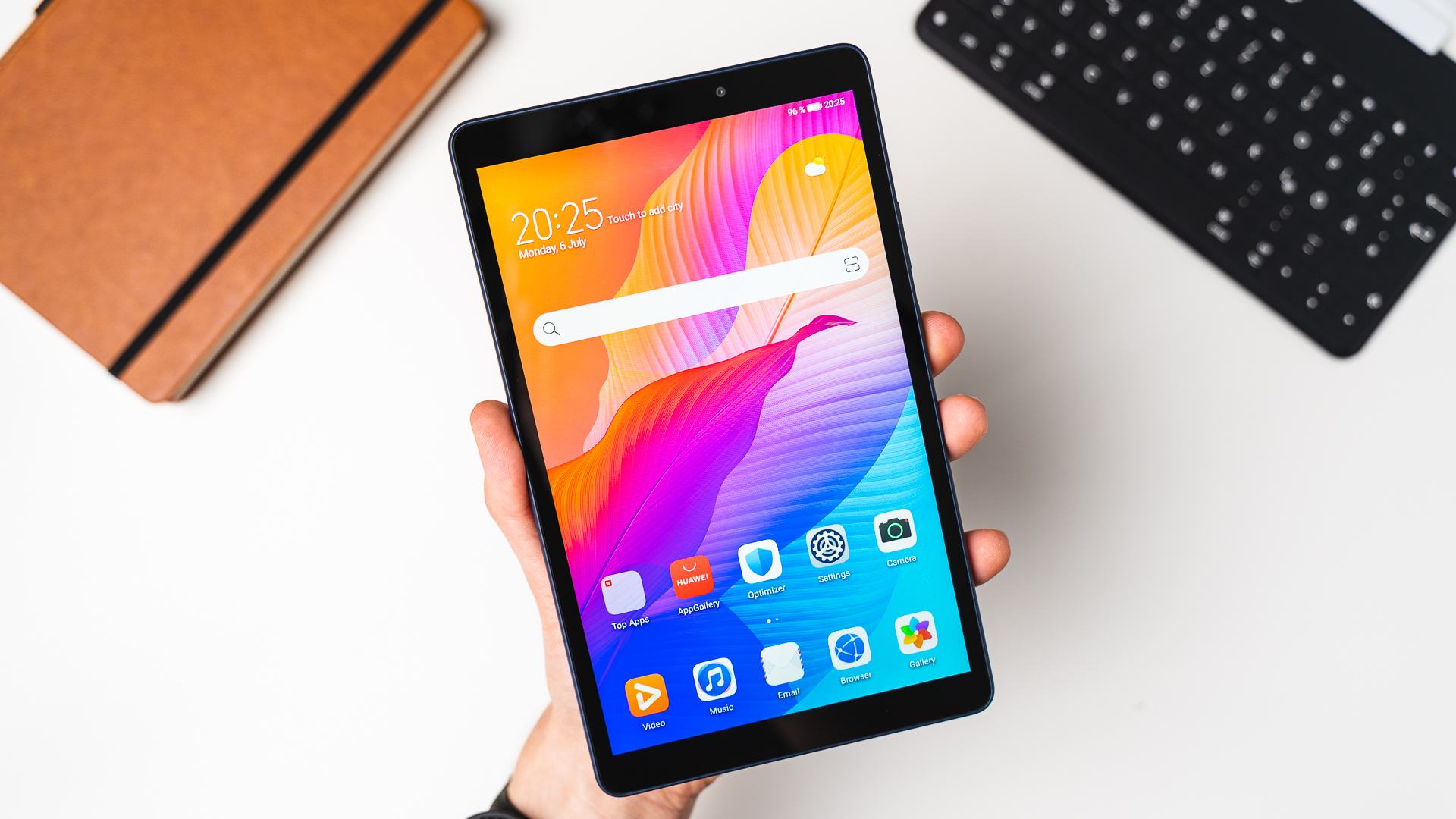
The Matepad T8 also has several features that make it a versatile device. It has an 8-inch HD display that is perfect for streaming videos and browsing the web. Additionally, it is powered by a quad-core processor and 2GB of RAM, which means it can handle most everyday tasks with ease.
Another feature that makes the Matepad T8 a relevant device is its long battery life. With a 5100mAh battery, the device can last for up to 10 hours of continuous use. This makes it a great option for those who are always on the go and need a device that can last all day.
The Matepad T8 also comes with a number of software features that enhance its functionality. One of these features is the "Huawei Share" which allows for easy file transfer between the Matepad T8 and other Huawei devices. This is particularly useful for those who use multiple devices and need to seamlessly transfer files between them.
Furthermore, the Matepad T8 runs on EMUI 10.1 based on Android 10, which is the latest version of Huawei's custom UI. This means that it will receive regular security updates and new features to keep it up to date.
In addition, the Matepad T8 also supports the use of a keyboard and a stylus, making it a great option for those who want to use it for work or school. This allows for a more comfortable typing experience and the ability to take notes and make sketches with ease.
In conclusion, the Huawei Matepad T8 is still relevant in 2023 because of its affordable price point, versatile features, long battery life, and software updates. It is a great option for those who are looking for a budget-friendly tablet that can handle everyday tasks, and it is particularly useful for those who need a device that can last all day. It is also a great option for those who want to use it for work or school because of its keyboard and stylus support.
It's a great choice for a budget-friendly tablet that can handle everyday tasks and is ideal for those who need a device that can last all day. Additionally, it's an ideal choice for those who want to use it for work or school because of its keyboard and stylus support. It's a great option for a budget-friendly tablet that can handle everyday tasks, and it's particularly useful for those who need a device that can last all day.
Wednesday, December 7, 2022
Find your perfect tablet match this Christmas with Lenovo
As the holiday rush continues toward Christmas and the New Year, what better way to show your favorite people some love than with great new devices to power their interests and passions?
Designed to meet the needs of every personality, Lenovo has a full range of tablets that can transform the way you live, work, and play. Each device is sure to give every member of the family the best balance of smarter productivity, smarter entertainment, and smarter living. Here’s the lowdown on what you can consider for every special person in your life:
For the ultimate fangirl ate
The Yoga Tab 11 is the perfect match for your Hallyu-loving ate. From binge-watching, the latest episodes of her favorite k-drama to belting out the lyrics of her idol’s latest single, this device is sure to become her new partner in crime. Flexible and packed with features for the best entertainment experience, the Yoga Tab 11 features unique multi-modes to match any activity. With a built-in kickstand and sleek design, users can hold, stand, tilt, and even hang the tablet depending on how or where they’re enjoying or creating content. Its quad JBL speakers optimized by Dolby Atmos will definitely be the cherry on top when you bond over the next online concert or K-drama marathon.
Get the Lenovo Yoga Tab 11 for as low as PHP16,995.
For the professional-by-day, gamer-by-night boyfriend
 Switching from Zoom meetings in the mornings to Discord calls with the barkada after work won’t be a problem with the Lenovo Tab P11 Pro. With its powerful Qualcomm Snapdragon 730G Octa-Core processor, a blend of work and play is within reach alongside PC-class productivity and endless entertainment possibilities. Both brainstorming sessions and date nights will never be the same with the power of the Lenovo Tab P11 Pro’s immersive 11.5" QHD OLED display with Dolby Vision and HDR10 for hyper-realistic visuals and true-to-life colors.
Get the Lenovo Tab P11 Pro starting at PHP24,995.
For the TikTok trendy and Netflix aficionado tita
Whether they’re trying out the latest TikTok DIY or are on their second hour of surfing through funny cat videos, your favorite tita will appreciate all that the Lenovo Tab P11 Plus has to offer. With its 2K display, immersive 85% screen-to-display ratio, and surround sound care of its quad Dolby Atmos-optimized speakers, she and her amigas are bound to enjoy hours of lag-free, HD content on the Lenovo Tab P11 Plus. Expect the family group chats to be flooded with endless links to videos and reality show recommendations throughout the holiday season and beyond.
Get the Lenovo Tab P11 Plus starting at PHP13,995.
 Your bestie is sure to breeze through their 2023 reading list with the Lenovo Tab M10 Plus (3rd gen). This budget-friendly tablet has a 10.61-inch 2K IPS display backed with the latest TÜV Eye Care technology and a dedicated reading mode for bibliophiles to enjoy a seamless experience each time they pick up this device. Its reading mode offers an adjustable, paper-like color matrix for maximum comfortable reading, and if they like jotting down their thoughts, the optional Lenovo Precision Pen 2 will allow for a natural handwriting experience --perfect for quick annotations and highlighting favorite quotes to share.
Get the Lenovo Tab M10 Plus (3rd gen) for as low as PHP10,995.
No matter what the personality, you’re sure to find the perfect Lenovo tablet to gift your loved ones this Christmas. Beyond gifting a device they’ll be sure to use in their every day, you’ll also be gifting them countless experiences you can share together with Lenovo tablets, enjoying reshaped expectations and experience empowered by Smarter Technology for All.
Catch these tablets on sale this 12.12 to get ahead of the holiday rush on the Lenovo Flagship Store here. You can also visit Lenovo Exclusive Stores and authorized resellers nationwide.
Designed to meet the needs of every personality, Lenovo has a full range of tablets that can transform the way you live, work, and play. Each device is sure to give every member of the family the best balance of smarter productivity, smarter entertainment, and smarter living. Here’s the lowdown on what you can consider for every special person in your life:
For the ultimate fangirl ate

The Yoga Tab 11 is the perfect match for your Hallyu-loving ate. From binge-watching, the latest episodes of her favorite k-drama to belting out the lyrics of her idol’s latest single, this device is sure to become her new partner in crime. Flexible and packed with features for the best entertainment experience, the Yoga Tab 11 features unique multi-modes to match any activity. With a built-in kickstand and sleek design, users can hold, stand, tilt, and even hang the tablet depending on how or where they’re enjoying or creating content. Its quad JBL speakers optimized by Dolby Atmos will definitely be the cherry on top when you bond over the next online concert or K-drama marathon.
Get the Lenovo Yoga Tab 11 for as low as PHP16,995.
For the professional-by-day, gamer-by-night boyfriend

Get the Lenovo Tab P11 Pro starting at PHP24,995.
For the TikTok trendy and Netflix aficionado tita
Whether they’re trying out the latest TikTok DIY or are on their second hour of surfing through funny cat videos, your favorite tita will appreciate all that the Lenovo Tab P11 Plus has to offer. With its 2K display, immersive 85% screen-to-display ratio, and surround sound care of its quad Dolby Atmos-optimized speakers, she and her amigas are bound to enjoy hours of lag-free, HD content on the Lenovo Tab P11 Plus. Expect the family group chats to be flooded with endless links to videos and reality show recommendations throughout the holiday season and beyond.
Get the Lenovo Tab P11 Plus starting at PHP13,995.
For the ever-pabibo bunso
Roblox breaks in between study sessions will be an extra treat for your youngest siblings with the Lenovo Tab M10 (3rd gen) as their trusty partner. A whole day of classes is nothing for the tablet with its super-fast octa-core processor and up to 10 hours of battery life. Your little brother or sister will also get to enjoy the built-in Google Kids Space, jam-packed with thousands of books, videos, and teacher-approved apps.
Get the Lenovo Tab M10 (3rd gen) for as low as PHP9,995.
For the bookworm bestie

Roblox breaks in between study sessions will be an extra treat for your youngest siblings with the Lenovo Tab M10 (3rd gen) as their trusty partner. A whole day of classes is nothing for the tablet with its super-fast octa-core processor and up to 10 hours of battery life. Your little brother or sister will also get to enjoy the built-in Google Kids Space, jam-packed with thousands of books, videos, and teacher-approved apps.
Get the Lenovo Tab M10 (3rd gen) for as low as PHP9,995.
For the bookworm bestie

Get the Lenovo Tab M10 Plus (3rd gen) for as low as PHP10,995.
No matter what the personality, you’re sure to find the perfect Lenovo tablet to gift your loved ones this Christmas. Beyond gifting a device they’ll be sure to use in their every day, you’ll also be gifting them countless experiences you can share together with Lenovo tablets, enjoying reshaped expectations and experience empowered by Smarter Technology for All.
Catch these tablets on sale this 12.12 to get ahead of the holiday rush on the Lenovo Flagship Store here. You can also visit Lenovo Exclusive Stores and authorized resellers nationwide.
Monday, November 7, 2022
Rediscover Learning and Entertainment with the 3rd Generation Lenovo Tab M10 and Tab M10 Plus
November 2022 – As adapting to a hybrid lifestyle continues to inspire more intuitive consumer experiences, Lenovo goes all in on more brilliant innovations benefiting daily life. With corners of our homes feeling stretched and thinned of inspiration or excitement, Lenovo is introducing the newest generation of Lenovo Tab M10 and Lenovo Tab M10 Plus, allowing consumers to open up their world in search of fresh ideas, transforming the way people live, work, and play with Smarter Technology for All.
“Designing with a purpose to meet customers’ needs with the
best devices at a great value is always the core of our business at Lenovo,” shares
Michael Ngan, President and General Manager of Lenovo Philippines. “The new
Lenovo Tab M10 and Tab M10 Plus redefine learning and entertainment experience
with greater performance, versatility, and portability, leading to more
inspiration-fueled discoveries with the aid of technology in an inclusive
digital world.”
Lenovo Tab M10 (3rd gen)
Discover a world of entertainment and learning with the new Lenovo Tab M10. This budget tablet keeps up with the wealth of content the digital space offers with the power of the latest Unisoc T610 Octa-core processor with up to 4GB of memory and 64GB of storage.

Its 4-side narrow-bezel and 10.1-inch FHD IPS display provides users an enjoyable entertainment experience with vibrant color from a comprehensive 100% sRGB color gamut paired with enhanced sound from the dual speakers by Dolby Atmos.
Not forgetting the little ones, the Lenovo Tab M10, hand in hand with Google Space Kids, provides kids a safe space where they can learn, create and play with an abundance of high-quality content available through apps in the Google Play store 
Along with the
Android 11 OS and 3 years of guaranteed security updates, the Lenovo Tab M10
provides a more personalized and seamless user experience that allows users to
set boundaries, manage content, and create better digital habits. Available in 3GB+32GB and 4GB+64GB
variants, take home the newest device that will give the entire family a joyful
streaming experience, starting at PHP9,995.
Lenovo Tab M10 Plus (3rd gen)
For users who crave the added punch of premium features, the new Lenovo Tab M10 Plus provides exactly that without burning through hard-earned money. Powered by the Snapdragon SDM680 or MediaTek G80 Octa-core Processor with up to 6GB Ram and 128GB of storage, this device provides longer hours, perfect for bingeing the best movies and TV shows or reading through e-books and other digital content.

Guaranteed to provide the best entertainment experiences at its friendly price point, The Lenovo Tab M10 Plus is equipped with a 10.61-inch 2K IPS display touchscreen with narrow bezels that boasts an 85% screen-to-body ratio to provide the optimal visual experience. It also offers dazzling, cinematic entertainment with every scene appearing crisp even in well-lit environments with the help of up to 400 nits of brightness paired with high-fidelity, immersive sound from its quad Dolby Atmos-optimized speakers.
The Lenovo Tab
M10 Plus is also a great learning companion. Its Reading Mode transforms the screen color into a paper-like matrix
that switches easily between chromatic and mono modes for longer and more
comfortable reading. Certified with TUV
Eye Care Technology, there will be less strain on the eyes, allowing for a
more extensive consumption of written work be it for work or relaxation. For
those who like jotting down notes, the Lenovo Tab M10 is compatible with the
Lenovo Precision Pen 2, providing users with a natural handwriting experience,
perfect during classes or meetings.
The Lenovo Tab
M10 Plus is also equipped with the latest
Android 12 OS and comes with the inclusion of 3-year-security updates to
allow users a continuous, smooth, and more personal UI experience.
Grasp high entertainment and educational experience on the Lenovo Tab M10 Plus, available in 3GB+32GB and 4GB+64GB variants starting at PHP 10,995.
Visit Lenovo Exclusive Stores and authorized resellers nationwide. For more information, follow Lenovo Philippines’ official Facebook page.
Monday, January 25, 2021
Microsoft Launches Surface Pro 7+ for Business, Surface Laptop Go for Business and Surface Go 2 for Business in the Philippines: Purpose-built to empower people, teams, and classrooms in the new digital age
[PHILIPPINES, JANUARY 2021] Microsoft today introduced Surface Pro 7+ for Business, Surface Laptop Go for Business, and Surface Go 2 for Business for commercial and education customers in the Philippines to support business productivity and continuity in remote and hybrid working environments. Surface Laptop Go and Surface Go 2 will start shipping today and Surface Pro 7+ for Business will start shipping from 8th February 2021 via Surface Commercial Authorized Resellers Nexus Technologies Inc., Accent Micro Technologies Inc., Advance Solutions Inc., and ePLDT Inc.
“Surface is more than a device — it is a strategic enabler for businesses. We are committed to designing technology that fosters productivity, creativity, and connection to empower people to be successful. We have spoken at length with many of our customers in the last year, listening to their journeys into remote everything. These discussions combined with extensive commissioned research and the work done by our Applied Sciences group, have helped us understand their rapidly evolving needs,” said Andres Ortola, Microsoft Philippines Country General Manager. “This was a critical part of our development process for Surface – ensuring commercial customer voices are not only heard but brought directly into our product development.”
Microsoft found four
key learnings during customer conversations and from the research:
1.
The future of working and learning is hybrid
and requires more flexibility: Views on remote work have changed, 82%
of managers say they will have more flexible work from home policies post
pandemic and 71% of employees want to continue work from home at
least part-time. People are sharing spaces throughout their home and are moving
locations more throughout their days to stay productive and accommodate others.
2.
Connectivity
is critical to uninterrupted business operations: With multiple
people in a household now connecting from home, it is putting a strain on
bandwidth - where people are using their cell phones more often as hot spots
for online meetings due to poor internet connectivity.
3.
Camera to camera is the new
face to face:
Microsoft
has learned through research that people are feeling more empathetic
to one another now, and through the lens of a video call they have a better
view of life at home and even feel more valued and included as a remote
contributor in meetings with everyone being in the same virtual room.
4.
End
to end security from chip to cloud is more critical than ever before: Organizations need their data
and workflows to be secure to enable remote and hybrid work. Devices need end
to end security features to enable the productivity needed to maintain business
continuity.
Surface Pro is by far the most widely adopted Surface device across enterprise and education customers and Microsoft continues to be inspired by its customers and their use of Surface.

Surface Pro 7+ also comes with the latest 11th Gen Intel Core Processors, 2.1 times faster performance, and longer battery life of up to 15 hours. The device offers the versatility people need to work wherever, whenever they want. In addition, with both USB-A and USB-C ports, Surface Pro 7+ offers the adaptability to dock into external displays and leverage the needed peripherals for a full workstation set up. Microsoft has also integrated front and rear-facing cameras into Pro 7+ with 1080p full HD video along with Dolby Atmos speakers and dual far-field Studio Mics so people can be seen and heard.
Surface Pro 7+ will come with a lightweight, sustainable commercial packaging that is 23% lighter than the previous generation and made from 99% natural fiber-based material, of which 64% is post-consumer recycled content. These updates are also reflective of Microsoft’s continued commitment to sustainability.
The Surface Pro 7+ for Business is priced at PHP 72,490.00.00.
Security, Deployment, and Manageability by design with
Surface Pro 7+
For the first time, Surface Pro 7+ will ship with Windows Enhanced Hardware Security features enabled out of the box. The devices can be managed and updated through the cloud from the first moment the device is turned on and throughout the device lifecycle without IT having to physically touch the device. Customers can have peace of mind in knowing they get great security without compromising employee or student experiences. Microsoft has accomplished this through tight integration between the UEFI (modern BIOS), firmware, and the Windows operating system stack and have shared their implementation of the Microsoft UEFI as open-source on GitHub as Project Mu.
The surface will also use the latest Microsoft deployment capabilities like Windows Autopilot to enable devices to ship directly from the factory to people’s homes and be ready to go with security policies, applications, and settings applied. Windows Autopilot gets people online, connected, and productive as quickly as possible, and eliminates time-consuming re-imaging and manual device set up for IT departments.
Finally, Microsoft recognizes the importance for customers to be in control of their data. Surface Pro 7+ will also feature a removable SSD for data retention, to support the security and privacy needs of commercial and education organizations. This feature, combined with Microsoft BitLocker protection, makes it easy for customers to retain sensitive data if something happens to their device.
Surface Laptop Go for Business

Surface Laptop Go has a beautiful 12.4” PixelSense touchscreen display[1], large precision trackpad and a full-size keyboard with 1.3mm key travel for an accurate and comfortable typing experience. The sleek, streamlined design comes in three durable and lightweight metal finishes in Platinum.
Surface Laptop Go is powered by Intel’s 10th generation i5 Quad-Core processor with 8GB RAM and 128GB storage[2] and is optimized for performance and battery life. For a quick and secure sign-in, the Surface Laptop Go 10th Gen Intel® Core i5, 8GB RAM, 128GB SSD has a Fingerprint Power Button with One Touch sign-in through Windows Hello. One Touch sign-in also provides fast, secured access to OneDrive for Business Vault files and more, so users can jump in quickly and be productive.
Surface Laptop Go feels snappy and fast taking full advantage of cloud-connected experiences like Microsoft 365 and online storage. With up to 13 hours of battery life[3] plus Fast Charging, will keep up with enterprise and education organizations’ users all day.
Whether learning or working, people are using their camera, speakers, and mics more now than ever before. Surface Laptop Go has a built-in 720p HD camera and Studio Mics, enabling classmates and colleagues to see and hear each other clearly. Omnisonic Speakers and Dolby® Audio surround users with amazing sound – whether on a video call, watching a movie, listening to music, and more. To help users connect, there are both USB A and USB C ports, an audio jack, and the Surface connector.
The Surface Laptop Go for Business is priced at PHP 44,990.00.00.
Surface Go 2 for Business

Surface Go 2 has a thin,
lightweight design with a 10.5-inch PixelSense display, improved battery life, and a model with up to 64% faster performance than the original with 8th Generation
Intel® Core™ M options for the first time. It has added Studio Mics, a dual-microphone solution, to increase voice clarity and reduce background noise for Microsoft
Teams meetings or video chats, and a 5MP front-facing camera delivers sharp
video even in low light. Additionally, the new Camera app for the rear-facing
camera makes it easy to scan documents and whiteboards – whether users are sharing
notes from a meeting or turning in homework. Paired with Surface Pen, Surface
Go 2 allows distance learners and remote workers to stay digital, while
unlocking the power of natural ink for things like drawing diagrams, marking up
documents, or working through math equations. The Surface Go can be paired with
a Platinum Type Cover.
Surface Go 2 for Business is priced at PHP 38,990.00.00.
Surface
for Business Accessories
Complete the experience on Surface Pro 7+ for Business with the new and improved Signature Type Cover (Black color), Arc Mouse (Platinum color) and Pen (Black color) that complement for enterprise customers. For Surface Go 2 for Business, pair with the Type Cover (Platinum color). The Surface Dock 2 transforms the Surface device into a desktop PC with a 199W power supply to charge Surface devices, plus USB-C® ports that support dual 4K monitors at 60Hz.
Surface for Business
Surface for Business
devices provide specific experiences and features built especially for
commercial customers including enterprise-grade security, and leading modern
management with Autopilot, Surface Enterprise Management Mode (SEMM) and
Microsoft Intune. Windows 10 Pro comes standard on Surface for Business
devices, offering additional built-in security and management features that
lets our customers focus on running their business. In addition to the standard
hardware warranty, Surface for Business customers get free Advanced Exchange
- a warranty service with expedited device replacement, at no additional cost.
+++
The latest Surface for Business devices will be available in the following configurations in the Philippines:
|
Model |
Suggested Retail Price (in PHP) |
|
Surface Pro 7+ for Business 11th Gen Intel® Core i5, 8GB RAM, 256GB SSD (Available in Platinum)
|
PHP
72,490.00.00 |
|
Surface Laptop Go 10th
Gen Intel® Core i5, 8GB RAM, 128GB SSD (Available in Platinum)
|
PHP 44,990.00.00 |
|
Surface Go 2 8th Gen
Intel® Core m3 Processor, 8GB RAM, 128GB SSD (Available in Platinum)
|
PHP 38,990.00.00 |
|
·
Surface Type Cover for Surface Pro (Available in Black) ·
Surface Type Cover for Surface Go (Available in Platinum) ·
Surface Arc Mouse (Available in Platinum) ·
Surface Pen (Available in Black) ·
Surface Dock 2 |
PHP
7,290.00 PHP 5,790.00 PHP 5,150.00 PHP 5,075.00 PHP
14,999.00
|
[1] Surface
Laptop Go display has rounded corners within a standard rectangle. When
measured as a standard rectangular shape the screen is 12.45” diagonally
(the actual viewable area is less).
[2] System
software and updates use significant storage space. Available storage is
subject to change based on system software updates and app usage. 1 GB = 1 billion bytes. See
Surface.com/Storage for more details.
[3] Up to 13
hours of battery life based on typical Surface device usage. Testing conducted
by Microsoft in September 2020 using preproduction software and preproduction
Surface Laptop Go Intel® Core™ i5, 128GB, 8 GB RAM Microsoft Surface® Edition
devices. Testing consisted of a full battery. discharge with a mixture of active
use and modern standby. The active use portion consists of (1) a web
browsing test accessing 8 popular websites over multiple open tabs, (2) a
productivity test utilizing Microsoft Word, PowerPoint, Excel, and Outlook, and
(3) a portion of time with the device in use with idle applications. All settings
were default except screen brightness was set to 150nits with Auto-Brightness
disabled. Wi-Fi was connected to a network. Battery life varies
significantly with settings, usage, and other factors.
Subscribe to:
Posts (Atom)